Contributing
Contributors and contributions are welcome.
Contributions to this repository include all (Git) version-controlled changes made to one or more files (including documentation files) in the repository, specifically, in the default (main) branch of the repository, as well as issues, which count as informal contributions that are external to version control.
Changes should be submitted in the form of a pull request (PR), which is then reviewed and approved by a repository member with the appropriate level of permission, after which the pull request is merged into the repository and the changes incorporated.
Preliminaries
Contributors should note the following requirements before submitting pull requests.
1. Local Working Repository
Have a dedicated, local working copy of the original ISARICResearch/ISARICAnalytics repository either as a direct clone or a clone of a fork of the original.
With the direct clone option the local copy will be pointing to the original repository as the remote, which can be checked using Git using the following command from the root of the clone:
$ git remote -v
origin   git+ssh://git@github.com/ISARICResearch/ISARICAnalytics (fetch)
origin   git+ssh://git@github.com/ISARICResearch/ISARICAnalytics (push)
If using the forked clone option the local copy will instead be pointing to the contributor’s fork as the remote, which can also be checked using the same command above.
Note
Remotes can be managed with the git remote command. While Git supports multiple remotes it is not necessary to use a second remote in this project different from ISARICResearch/ISARICAnalytics.
2. Repository Permissions
If using the direct clone option check that the required level of permissions exists - typically, if the contributor is not already part of the ISARIC Research GitHub organisation, access is granted as an external collaborator with the ability to read from and write to the repository. For further information consult the repository maintainers, who are listed in the README.
3. Development Environment & Dependencies
Set up a dedicated development environment that is appropriate for the project, including checking that the minimum Python version matches and that all the development dependencies are installed in this environment.
The tools used to set up the development environment and manage dependencies are entirely at the contributor’s discretion. For managing dependencies something as simple as pip could be sufficient, but something more advanced such as Astral uv is recommended.
If using uv note that it creates, on installation, its own virtual environment in a subfolder in the working directory named .venv, and applies all dependency changes inside .venv. If a different, pre-existing virtual environment is preferred when using uv then this can be done by setting the UV_PROJECT_ENVIRONMENT environment variable to the pre-existing environment folder path:
$ export UV_PROJECT_ENVIRONMENT="/path/to/your/preexisting/env"
The project’s development dependencies are specified as named groups of dependencies in the dependency-groups section of the project TOML, each group listing the (third-party) dependencies specific to some aspect of project development, such as pre-commit hooks, testing, or documentation. Specific dependency groups can be installed by name, for example, test dependencies with pip using:
pip install --verbose --group test
or, for example, documentation dependencies with uv (see uv sync):
uv sync --verbose --group docs
Note that in both examples above (1) package-specific dependencies will also be installed, as development dependencies are not typically used in isolation but complement the package development - if this is not wanted use the no-deps flag if using pip, or the --only-dev flag if using uv; and (2) the project itself will also be installed as a package (isaricanalytics) - if this is not wanted then add the --only-deps flag if using pip, or the the --no-install-project flag if using uv. When installing multiple dependency groups each group can be specified separately with the --group flag.
To install all the development dependencies, including the package dependencies and the project itself, use the pip command:
pip install --verbose -e .
or the uv command:
uv sync --verbose --all-groups
As noted above, if using uv sync the project itself will be installed in the environment - if this is not wanted add the no-install-project flag.
Basic PR Workflow
The basic PR-based contributions workflow is described below in very general terms, omitting specifics of any particular tools such as Git, command line shells, IDEs etc. Some familiarity with Git and GitHub is assumed and also useful. As this is independent of the contributions workflow the relevant and appropriate documentation or external learning resources can be consulted.
Create a new branch in your local repository for development - usually this will be created from the latest copy of the
mainbranch of the ISARICResearch/ISARICAnalytics repository or your fork (of that repository).Push the branch upstream to the GitHub repository (called the remote, and usually named
originin Git), which will either be ISARICResearch/ISARICAnalytics or your fork, then create a PR from the upstream branch targeting themainbranch of ISARICResearch/ISARICAnalytics, and also mark the PR as a draft to indicate that it is under development (or work in progress).Make your changes in the PR. Once you’re satisfied with the changes, mark the PR as ready for review, and then request a review from a repository member - one reviewer is sufficient and necessary, and all PRs require a minimum of one approval, although reviews can be requested from more than one person if this is required.
If the PR is approved, merge it yourself if you have the necessary permissions, or, alternatively, request a merge from either the reviewer(s) or another repository member who can merge it.
If there are questions or requested changes from the reviewer these must be addressed - this may require further changes to be staged and committed on the local branch in the usual way, before updating the upstream branch (which automatically updates the PR); it may also require PR discussions to be resolved. Request another review and approval if required, and merge the PR as described above.
Note
A draft PR cannot be merged, which is why it is advisable to mark a PR under development as a draft to prevent an accidental approval and merge. Draft status should be removed only when the PR is ready to be reviewed, as described above. The only possible exception to marking a PR as a draft is if the changes are so simple and/or minimal that it can be submitted for review on the first (or second) pass.
PR Status Checks
Contributors should familiarise themselves with a number of automated status checks (running as GitHub Actions workflows) that are automatically triggered whenever a PR is updated. These are:
Pre-commit checks - mainly code linting.
Package builds - package artifact builds (source distribution, Python wheel) and a package import test from the wheel.
Unit tests with code coverage checks - running unit tests, and measuring and uploading a code coverage report (to Codecov.io).
PR patch code coverage checks - called patch status, this measures code coverage of the source lines modified in the PR, and is another status check involving Codecov.io.
CodeQL code scanning and quality checks.
PR-specific Read the Docs (RTD) documentation builds - see this for further information.
Managing the PR
Any PR problems such as status check errors, merge conflicts, or other anomalies, should be investigated and resolved.
Status check errors can be investigated by inspecting the GitHub Actions workflow logs for the relevant workflow.
Merge conflicts can be resolved locally on the command line, but this is best done only if you’re familiar with Git, otherwise please ask a maintainer. Merge conflicts can also be resolved on GitHub. Resolving a merge conflict will always create a new merge commit in the PR branch.
An example screenshot from a PR with all checks passing is given below.
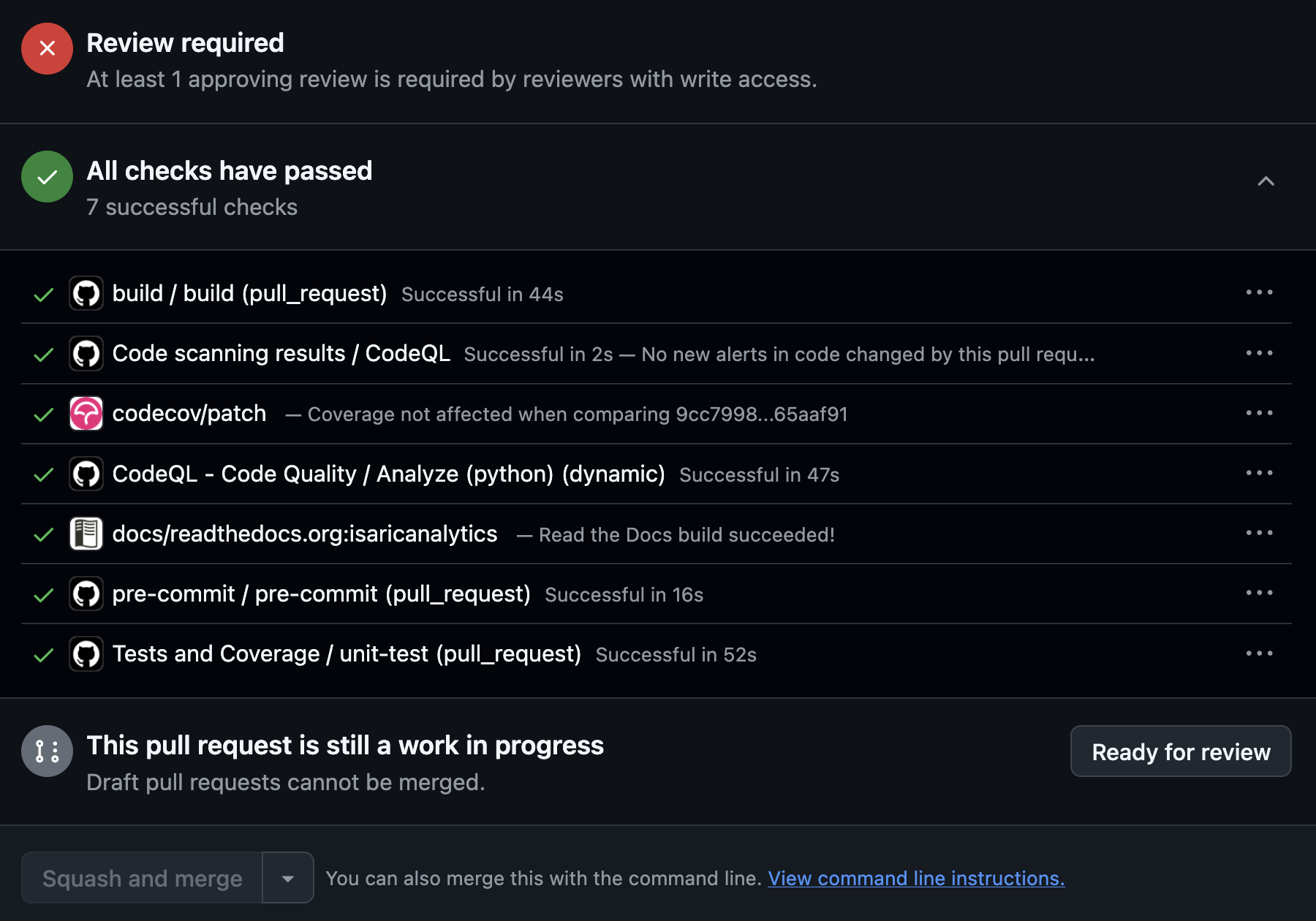
Another point to note is that if the PR’s target (or base) branch, usually main, is updated (by other PRs or direct commits) while the PR is still in development or review (and is therefore unmerged), you should see a warning on the PR status checks box that it is out of date and should be updated. This may sometimes lead to merge conflicts, which must be resolved as described above, before proceeding with further PR changes.
PR Rules
Contributors should note two basic rules that are in place and apply to all PRs. These are:
A PR approval is dismissed if it is updated with new commits pushed after that approval - this is to ensure that all current changes are subject to review prior to any approval. For this reason contributors should, if possible, request a review once they’re satisfied that all changes are complete. But if an approval is dismissed contributors should always request a new review, because only an approved PR can be merged (subject to the second rule).
An approved PR cannot be merged until all PR discussions/conversations are resolved - this is to ensure that any lingering questions or issues raised in a discussion have been addressed before merging the PR.
These rules can only be bypassed by an ISARICResearch GitHub organisation owner or repository administrator. Please contact a maintainer for further information.
GitHub Issues
As mentioned in the introduction to this page, creating GitHub issues also counts as contributing, but is external to version control.
Issues can be used to define and discuss features, bugs and other relevant improvements or changes. They can also be linked to PRs. For more information see the GitHub documentation.
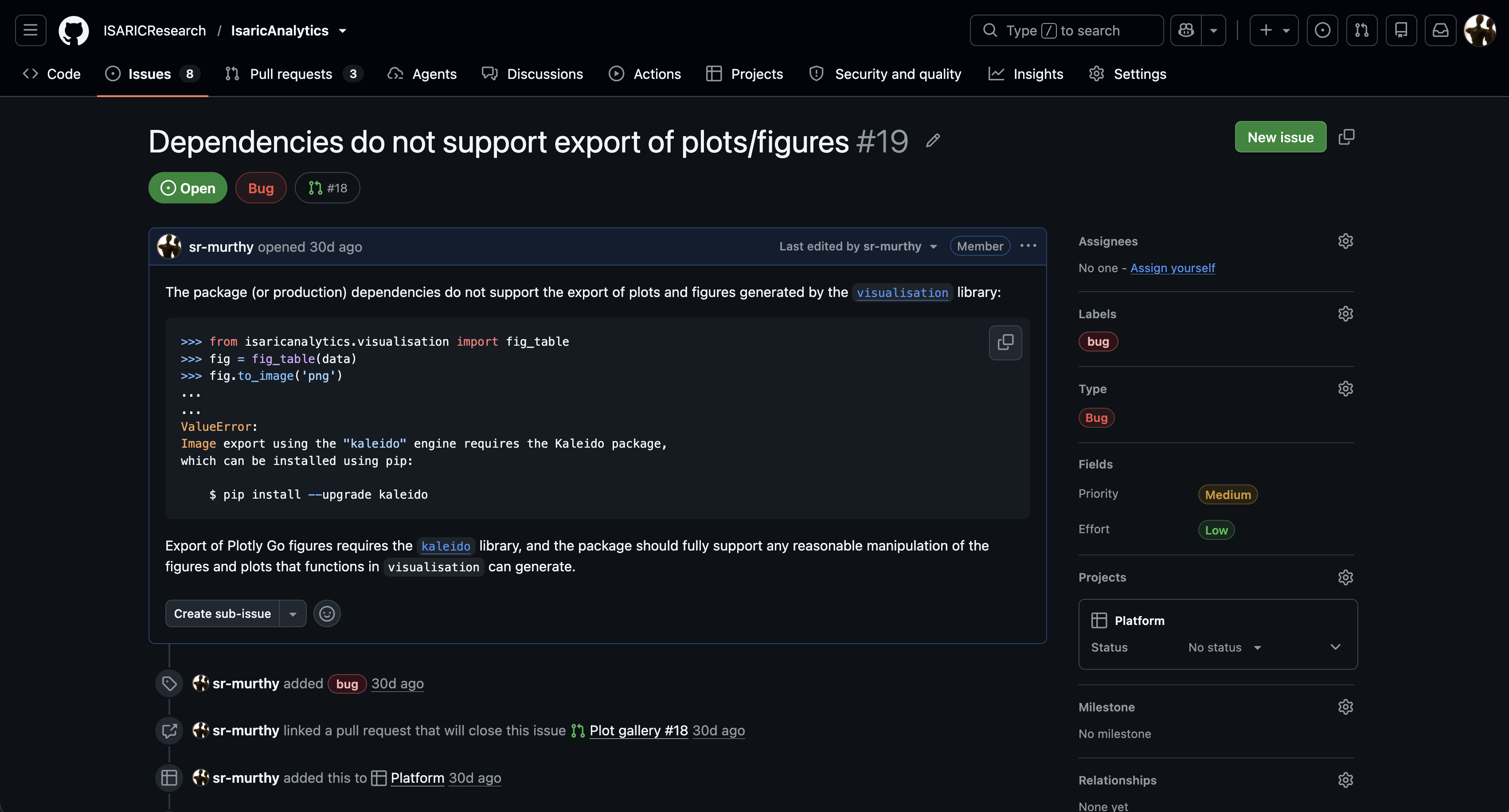
Issues have settings such as assignees, colour-coded tags/labels, type, priority and effort, project etc. and can be linked to PRs. These appear on the right hand side of the issue page, and it is recommended to apply as many of the relevant settings, especially the setting to link an issue to a relevant PR where possible. Refer to the screenshot below of an actual current issue in this repository.
Development Guide
This section is an informal discussion of ways of achieving good code quality in development through standardised practices and tools.
Code Hygiene
It is useful to start with some basic, commonly accepted principles of code hygiene in development:
Code should be readable in the sense of being (relatively) easy to follow and understand by others.
Code formatting and styling, including naming conventions, should be consistent, as this not only contributes to readability but makes it easier to identify inconsistencies.
Code should be concise in the sense of being simple enough to achieve the task at hand, and not too verbose or overcomplicated.
Code should be tested where possible - if this isn’t possible then a follow-up task should be created to add tests.
It may not always be possible to adhere to all these principles in every development scenario, but it is still a good idea to try. While some of these principles, such as consistency and tests, are at least partly enforced (and enforceable) others are not and are left to the contributor’s discretion.
Some Recommendations
With the code hygiene principles in mind, contributors are recommended to consider using the following practices:
Ensure that pre-commit hooks are integrated into your development environment so that they are triggered by local commits in the repository. This requires the Python pre-commit dependency to be installed. The hooks specific to this repository, which include Ruff code linting, are defined here, and can also be triggered manually by running:
pre-commit run --all-files
Use docstrings and type hints for all public functions and public class methods in public modules, excluding private (non-public) functions and methods in public modules, and private modules entirely. The recommended docstring style is the Numpy style, which uses reStructuredText syntax and is rendered (in HTML) with Sphinx. Function and method docstrings should contain, at minimum, the following details: a top-level concise description, parameters (arguments) if present, return values if present, exceptions if present, in that order. Example snippets that can be used for doctests are optional, but should be added if examples are available and easy to reproduce. Any warnings or notes can also be added using the appropriate reStructuredText directives. Docstrings should be kept up-to-date with changes in the source code. Refer to the package libraries in this repository, where all public functions and class methods have Numpy docstrings.
Where code is lengthy, complex or not self-explanatory, organise the code into logically related blocks and prefix each block with a concise explanatory comment. This can really help in making the code readable and comprehensible.
In public modules, list all public members lexicographically in the special __all__ member. The list should be kept up-to-date with changes in module members. This is already done in all the existing package libraries, so if any existing members of a module are modified ensure that the
__all__list is updated appropriately.Order module members in some meaningful way, for example, lexicographically. In an unordered module with many members, say, upwards of 20, it is harder to locate members. If you’re adding or modifying members in an existing module ensure that the existing member order is respected. Module member ordering is not currently being applied in the package libraries, but this could easily be done.
If you’re working on a reusable function, class method or, generally, some callable, use an appropriate level of generality, i.e. a level that is not too general or too specific to the task. There is no absolute level of generality, and finding the right level requires a subjective judgment about what is appropriate to the level or scope of reusability. It may be useful to refer to the SOLID principles for general guidance, particularly, the single responsibility principle as applied to functions and methods, which says that each function or method should do one and only one thing. This recommendation does not apply to code that is task- or problem-specific where reuse isn’t possible.
Locate new code appropriately. So, new functions, class methods, or callables (such as classes) should be added to an existing module or library if the new functionality is logically related to that module. Otherwise, a new module, or even a new subpackage, may be more appropriate.
Where possible, minimise changes to dependencies, especially, package-specific (third-party) dependencies, and instead look to re-use the existing set of dependencies and/or the standard libraries. A good rule to follow is to only add a dependency if it is necessary for the implementation of whatever changes are being developed. Every additional dependency introduces its own dependencies, each of which introduces its own dependencies (called transitive dependencies), and this not only increases the complexity of maintaining the enlarged set of dependencies (in reality, a dependency tree) but may introduce new pathways for vulnerabilities and dependency-related errors to enter the project.
Add unit tests where possible, especially for critical functions and callables. Unit tests are located inside the
tests/unitfolder. The recommended test runner is pytest, although for local testing, in principle, any other suitable test runner could be used. If there is a need to reuse test data across a number of test cases or classes pytest fixtures should be used - there is currently atests/conftest.pystub provided in which new fixtures can be defined.